
Step-by-Step Guide
How to Use DocketMe
Follow the guide below to submit a hearing request, understand the process, and track your case — whether you are a pro se litigant or a licensed attorney.
For Pro Se Litigants (Self-Represented Parties)
A pro se litigant is someone who represents themselves in court without an attorney. DocketMe makes it easy for you to request a hearing online. You will need your case number, your email address, and basic information about your case. You do not need an attorney to use this tool.

Go to the DocketMe Home Page
Navigate to the DocketMe home page at the link provided by the court. You will see the main landing page with the "Request a Hearing" section below.

Select Your County
Under "Request a Hearing," choose either Newton County or Walton County — whichever county your case is filed in.

Select "Pro Se Litigant"
When asked who you are, select "Pro Se Litigant." This means you are representing yourself without an attorney.

Fill Out the Hearing Request Form
Complete the form with your case information. You will need to provide your case number, the names of all parties, your contact information, and the type of hearing you are requesting.

Answer the Procedural Checklist
The form includes a checklist of procedural questions the court needs answered before scheduling. Answer each question truthfully.

Submit Your Request
Review your information and click "Submit." You will receive a confirmation email at the address you provided.

Track Your Request Status
You will receive email notifications whenever your status changes. You can also check your status at any time by visiting the DocketMe home page and clicking "Check Status."
Reference
Understanding Your Request Status
Every hearing request moves through one or more of these statuses. Here is what each one means.
Pending
Your request has been received and is waiting to be reviewed by the judge's office. No action is needed from you at this time.
Under Review
A staff member is actively reviewing your request. This may include verifying case information, checking procedural requirements, and assessing readiness.
Deficiency
There is an issue with your request that must be resolved before it can be scheduled. Read the message from the court carefully — it will tell you exactly what is needed.
Scheduled
Your hearing has been scheduled. You will receive the date, time, and courtroom details by email. Mark your calendar and notify all relevant parties.
Mediation Ordered
The court has ordered mediation before the hearing can be scheduled. You must complete mediation and provide proof before the hearing request will be reconsidered.
Denied
The hearing request has been denied. The message from the court will explain the reason. You may need to address underlying issues before resubmitting.
Cancelled
The hearing request has been cancelled, either by the court or upon request. If this was in error, please contact the court.
Common Questions
Frequently Asked Questions
Can I submit a request without creating an account?
Pro se litigants must create a free account to submit a request, which allows you to track your case and receive status updates. Attorneys must log in to access the attorney-specific form and portal.
How long does it take for my request to be reviewed?
Review times vary based on the court's docket volume. You will receive an email notification as soon as your status changes. Do not contact the clerk's office to check — use DocketMe's Check Status feature.
What if I made a mistake on my form?
You can log back in to DocketMe using your email and password and edit your request directly — as long as it has not yet been scheduled. Simply sign in, navigate to your request, and make the necessary corrections.
I received a "Deficiency" notice. What do I do?
Read the message carefully. It will explain what is missing or incorrect. Common deficiencies include missing service documentation, incomplete mediation, or insufficient case details.
Will I receive a hearing date automatically?
Once your request is approved, the court will schedule your hearing and notify you by email. You will not need to call or follow up — the email notification will include your hearing date, time, and courtroom.
Can both parties submit a request for the same case?
Only one request per case is typically needed. If both parties submit requests, staff will consolidate them. Communicate with opposing counsel or the opposing party before submitting to avoid duplication.
What does the Attorney Portal look like after I log in?
Once you create an account and log in, you will be taken to your personal Attorney Portal dashboard. This dashboard lists all of your pending hearing requests across both Newton and Walton County, along with the current status of each request.
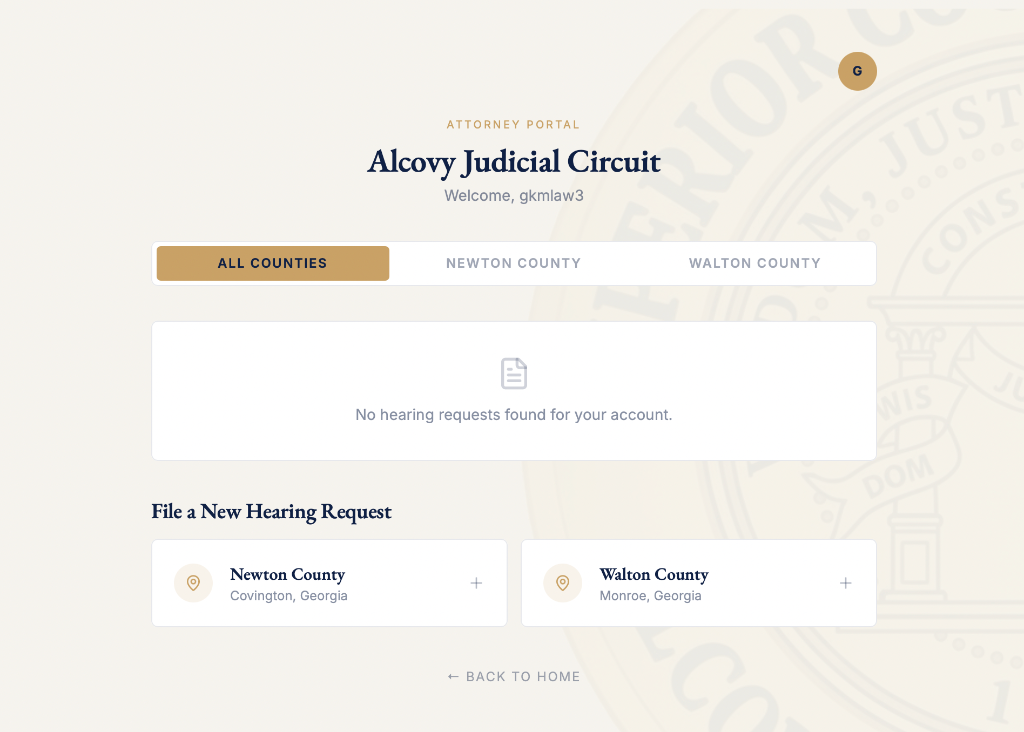
The Attorney Portal dashboard — your central hub for managing all hearing requests.
Ready to Submit Your Request?
Follow the steps above and submit your hearing request today. The court will review and respond by email.
Request a HearingAlcovy Judicial Circuit

Newton & Walton Counties · Georgia